
Displaying contacts
General information
1. "Office"
2. "Contacts"
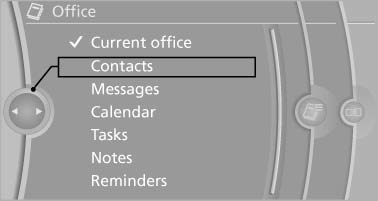
All contacts are listed in alphabetical order. Depending on the number of contacts, an A-Z search is offered.
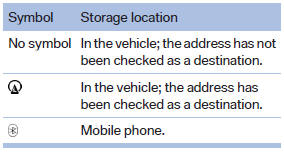
A symbol indicates the storage location of the contacts:
Dialing phone numbers*
1. Select the desired contact.
2. Select the phone number.
The connection is established.
Editing a contact
1. Select the desired contact.
2. "Edit contact"
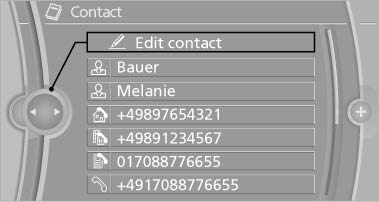
3. Change the entries.
4. "Store contact in vehicle"
When a contact is edited, the changes are not stored on the mobile phone. A copy of the entry is stored in the vehicle.
Selecting the contact as a navigation destination*
1. Select the desired contact.
2. Select the address.
When contacts from the mobile phone are used, the address may need to be matched to the navigation data contained in the vehicle. In this case:
Correct the address.
3. "Start guidance" or "Add as another destination"
Checking the address as a destination
An address that is to be used for destination guidance must match the navigation data contained in the vehicle. The address can be checked for this purpose.
1. Select the desired contact and highlight the address.
2. Open "Options".
3. "Check as destination"
4. Correct and store the address if necessary. If the address is corrected and stored, a copy of it is stored in the vehicle. The address is not changed on the mobile phone.
See also:
Reference
This chapter contains technical data, short
commands for the voice activation system, and an
index that will quickly take you to the information
you need. ...
SPORT
Sporty driving with optimized chassis and suspension
with maximum driving stabilization.
The program can be configured to individual
specifications. The configuration is stored for
the remote c ...
Navigation data
General informationNavigation data and authorization codes are available from your BMW center. Navigation
data are stored in the vehicle and can be updated.
> Depending on the data volume, a dat ...