
Phone book
Displays
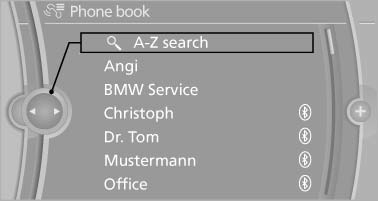
The phone book accesses the contacts and shows all contacts for which a phone number has been stored. The entries can be selected to make a call.
1. "Telephone"
2. "Phone book"
A symbol indicates the storage location of the contacts.
Calling a contact
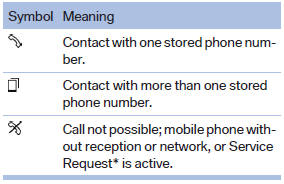
For contacts with one stored phone number: select the required contact. The connection is being established.
For contacts with more than one stored phone number: select the required contact and the phone number. The connection is being established.
Editing a contact
Changing the entries in "Contacts". When a contact is changed, the changes are not stored on the mobile phone. A copy of the entry is stored in the vehicle.
1. Highlight the contact.
2. Open "Options".
3. "Edit entry"
The contact can be edited.
See also:
Reading lamps
Reading lamps
Press the button.
Reading lamps are located at the front and rear
next to the interior lamps. ...
Software Update
The vehicle supports various external devices
depending on the current software version. With
a software update, the vehicle can support new
cell phones or new external device, for example.
The ...
Traction
The traction grades, from highest to lowest, are
AA, A, B, and C.
Those grades represent the tire’s ability to stop
on wet pavement as measured under controlled
conditions on specified governme ...