
Pairing and connecting a device
 Pairing a device
To avoid becoming distracted and posing an unnecessary hazard both to your own vehicle's occupants and to other road users, only pair the device while the vehicle is stationary.
Pair the vehicle entirely on the front or rear Control Display.
1. "Telephone"
2. "Bluetooth® (phone)"
3. "Add new phone"
The Bluetooth name of the vehicle is displayed.
4. To perform additional steps on the mobile phone, refer to the mobile phone operating instructions: for instance, search for or connect the Bluetooth device or a new device.
The Bluetooth name of the vehicle appears on the mobile phone display.
5. Select the Bluetooth name of the vehicle on the mobile phone display.
Prompt via iDrive or the mobile phone to enter the same Bluetooth passkey.
6. Enter the passkey and confirm.
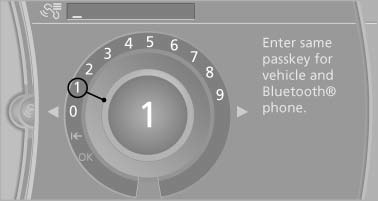
7. Select the functions for which the mobile phone is to be used.
8. "OK"
If the pairing was successful, the mobile phone appears at the top of the list of mobile phones. The functions supported by the mobile phone and audio device are displayed as symbols when paired.
White symbol: the function is active.
Gray symbol: the function is inactive.
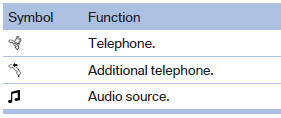
Four devices can be paired with the vehicle at once. Three devices can be connected with the vehicle at once.
If pairing was unsuccessful: What to do if....
See also:
Selecting a station manually
Station selection via the frequency.
1. "Radio".
2. "FM" or "AM".
3. "Manual".
4. To select the frequency: turn the controller.
To store the station: pre ...
Programmable memory buttons
General information
The Owner's Manual can be stored on the programmable
memory buttons and called up directly.
Storing
1. "Owner's Manual" Select via the iDrive.
2. Press the desired ...
Assist system information
Display on the Control Display
Information on the Assist system can be displayed
by activating Assist on the Control Display.
1. "Settings"
2. "Control display"
3. "Driv ...