
External devices
General information
External audio and video devices and digital cameras can be connected to cinch sockets, on the CD/DVD player. Operation takes place on the external device.
Due to the large number of different audio and video devices available on the market, it cannot be ensured that every audio and video device will be displayed correctly on the screen.
Connecting an external device
1. Fold down the cover in front of the cinch sockets on the CD/DVD player.
2. Connect the external device to the RCA sockets.
- Video: yellow socket.
- Audio: white and red socket.
Starting playback
1. "CD/Multimedia"
2. "External devices"
3. Select the
 or
or
 symbol.
Volume
The volume of the sound output is dependent on the audio device. If this volume differs markedly from the volume of the other audio sources, it is advisable to adjust the volumes.
Adjusting the volume
The volume can only be adjusted if no external video device is connected.
1. "CD/Multimedia"
2. "External devices"
3. Select the
 or
or
 symbol.
4. "Volume"
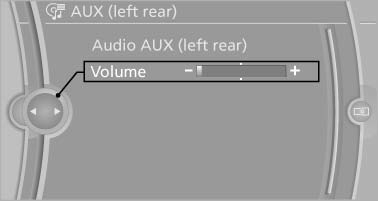
5. Turn the controller until the desired volume is set and press the controller.
See also:
Possible commands
Most menu items on the Control Display can be spoken as commands.
The available commands depend on which menu is currently selected on the Control
Display.
There are short commands for functions o ...
Activation/deactivation
Press the button. ...
Cleaning the windshield and headlamps
Pull the lever, arrow 4.
The system sprays washer fluid on the windshield
and activates the wipers briefly.
When the vehicle lighting system is switched on,
the headlamps are cleaned at regular ...