
Stored stations
General information
It is possible to store up to 40 stations.
Calling up a station
1. "Radio"
2. "Presets"
3. Select the desired station.
Storing a station
The station currently selected is stored.
1. "Radio"
2. "Presets"
3. "Store station"
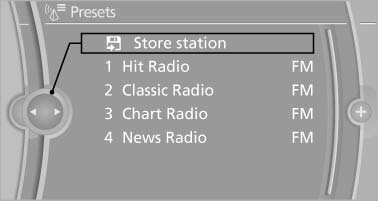
4. Select the desired memory location.
The list of stored stations is stored for the remote control currently in use.
The stations can also be stored on the programmable memory buttons.
Deleting a station
1. "Radio"
2. "Presets"
3. Select the desired station.
4. Open "Options".
5. "Delete entry"
See also:
Vehicle equipment
All standard, country-specific and optional
equipment that is offered in the model series is
described in this chapter. Therefore, equipment is also
described that is not available in a vehicle, ...
Tilting the glass sunroof
Press the switch.
The closed sunroof is tilted and
the sliding visor opens slightly.
Do not use force to close the sliding visor
Do not use force to close the sliding visor
with the glass s ...
Automatic climate control with 2-zone control
Automatic climate control with 2-zone control
1. Seat heating and ventilation, driver's side
2. Temperature, left side of passenger compartment
3. AUTO program
4. Temperature, right side of pas ...