
Multi-channel playback, surround
Choose between stereo and multi-channel playback, surround.
Setting multi-channel playback, surround
1. "CD/Multimedia", "Radio" or "Settings"
2. "Tone"
3. "Surround"
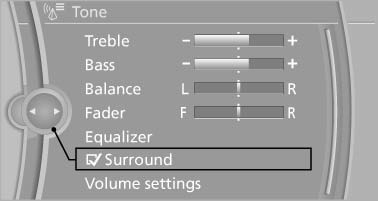
When surround is activated, multi-channel playback is simulated when a stereo audio track is played.
See also:
Windshield washer nozzles
The washer jets are automatically heated whenever
the ignition is switched on. ...
Status field symbols
The symbols are grouped as follows.
Radio symbols
Telephone symbols
Entertainment symbols
Additional symbols
...
Maintenance
Vehicle equipment
All standard, country-specific and optional
equipment that is offered in the model series is
described in this chapter. Therefore, equipment
is also described that is not avai ...