
Equalizer
Setting for individual audio frequency ranges.
Adjusting the equalizer
1. "CD/Multimedia", "Radio" or "Settings"
2. "Tone"
3. "Equalizer"
4. Select the desired setting.
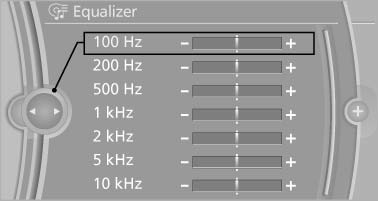
5. To adjust: turn the controller.
6. To store: press the controller.
See also:
Vehicle Overview
The rear-wheel-drive BMW 1 Series enters its fifth year on the market with a
few visual changes, as well as a new higher-performance version from BMW's M
division, dubbed the 1 Series M. At the ot ...
Selecting the sorting order of the
names
Names can be displayed in a different order.
1. "Office"
2. "Contacts"
3. Open "Options".
4. "Display: last, first name" or "Display: first,
last nam ...
USB audio interface/mobile phone audio interface
At a glance
It is possible to connect external audio devices.
Operation can be performed via iDrive. The
sound is output on the vehicle loudspeakers.
Connectors for external devices
▷ Conn ...