
Treble, bass, balance, and fader
▷ "Treble": treble adjustment. ▷ "Bass": depth adjustment. ▷ "Balance": left/right volume distribution. ▷ "Fader": front/rear volume distribution.
Setting treble, bass, balance, and fader
1. "CD/Multimedia", "Radio" or "Settings"
2. "Tone"
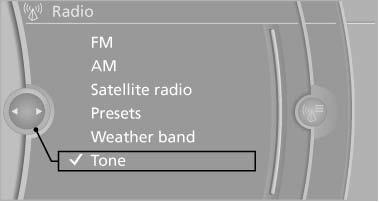
3. Select the desired tone settings.
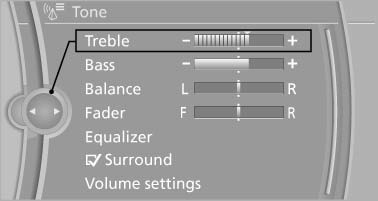
4. To adjust: turn the controller.
5. To store: press the controller.
See also:
World firsts
The BMW 7-Series' drivetrain superiority is reinforced with a plethora of
automotive firsts. All BMW 7-Series can now be specified with the world's first
Head-up Display incorporating a speed limi ...
Managing the favorites
Activating/deactivating the favorites
Favorites can be activated and deactivated
globally and individually.
1. "Satellite radio"
2. "Manage favorites"
3. Select "Activa ...
Tire inflation pressures at max. speedsabove 100 mph/160 km/h
Speeds above 100 mph/160 km/h
In order to drive at maximum speeds in excess
of 100 mph/160 km/h, please observe, and,
if necessary, adjust tire pressures for speeds
exceeding 100 mph/160 km/h fro ...