
Warning of people in danger
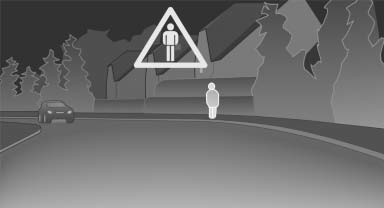
If the system detects a person in the defined area in front of the vehicle and if there is the danger of a collision with this person, a warning symbol appears in the Control Display and Head-up Display*.
Although both the shape and the heat radiation are analyzed, false warnings cannot be ruled out.
Warning area in front of the vehicle
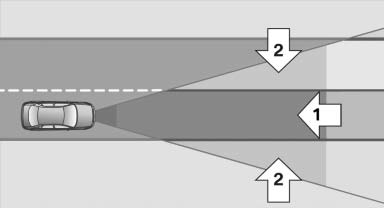
The warning area in front of the vehicle is divided into two areas.
- Central area 1 directly in front of the vehicle.
- Expanded area 2 to the right and left.
The entire area moves along with the vehicle in the direction of the steering angle and changes with the vehicle speed. As the vehicle speed increases, the area becomes longer and wider, for example.
Symbols
 This symbol is displayed when a
person
is detected in the central area, arrow 1,
immediately in front of the vehicle.
This symbol is displayed when a
person
is detected in the central area, arrow 1,
immediately in front of the vehicle.
 This symbol is displayed when a
person
detected in the extended area, arrow 2,
is moving from the right or left to the central area.
This symbol is displayed when a
person
detected in the extended area, arrow 2,
is moving from the right or left to the central area.
Display in the Head-up Display
 The warning is simultaneously
displayed
in the Head-up Display and in the
Control Display. The displayed symbol
can vary with the people detected. For people
located in the central area, the distance to the
person is indicated by the size of the symbol.
The warning is simultaneously
displayed
in the Head-up Display and in the
Control Display. The displayed symbol
can vary with the people detected. For people
located in the central area, the distance to the
person is indicated by the size of the symbol.
See also:
Message when the system was not
reset
A Check Control message is displayed.
The system detected a wheel change but was
not reset.
Warnings regarding the current tire inflation
pressure are not reliable.
Check the tire inflation pre ...
General information
The sound settings are stored for the remote
control currently in use. ...
Fuel quality
Fuels that are marked on the gas pump as containing
metal must not be used.
Refuel only with unleaded gasoline without
metallic additives.
Do not refuel with any leaded gasoline or gasoline
with ...