
Buttons at a glance
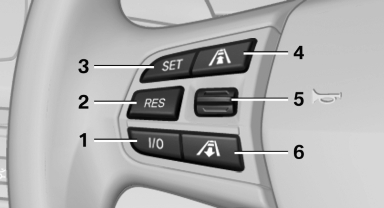
1 System on/off, interrupt
2 Resume speed
3 Store speed*
4 Reduce distance
5 Store, maintain/change speed
6 Increase distance
See also:
Notes
▷ The ranges of Apps that can be displayed on
the Control Display depend on the range of
installed software applications on the mobile
phone.
▷ The data transmission of the software ...
Automatic deactivation during forward travel
The system switches off when a certain driving
distance or speed is exceeded.
Switch the system back on if necessary. ...
Telephone
...