
Increasing or decreasing vehicle speed
You can specify your desired speed in the range from approx. 4 mph/6 km/h to approx. 15 mph/ 25 km/h using the rocker switch of the cruise control on the steering wheel. You can change the vehicle speed by pressing on the accelerator lightly.
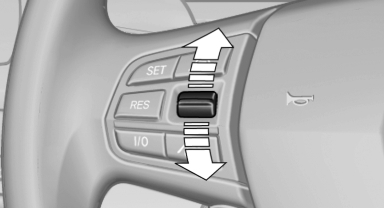
- Press up the rocker switch to the point of resistance: the speed increases gradually.
- Press up the rocker switch past the point of resistance: the speed increases while the rocker switch is pressed.
- Press down the rocker switch to the point of resistance: the speed decreases gradually.
- Press down the rocker switch past the point of resistance: when driving forward, the speed decreases to approx. 6 mph/10 km/h; when reversing, the speed decreases to approx. 4 mph/6 km/h.
See also:
Manual air distribution
The air distribution can be adjusted to individual
needs.
Press the button repeatedly to
select a
program:
▷ Upper body region.
▷ Upper body region and footwell.
▷ Footwel ...
Front lamps, bulb replacement
At a glance
1 Adaptive light control
2 Parking lamp, daytime running lights*
3 Low beams/high beams
4 Turn signal
Xenon lamps
Because of the long life of these bulbs, the likelihood
of failu ...
Automatic climate control with 2-zone control
Automatic climate control with 2-zone control
1. Seat heating and ventilation, driver's side
2. Temperature, left side of passenger compartment
3. AUTO program
4. Temperature, right side of pas ...