
Split screen
General information
Additional information can be displayed on the right side of the split screen, e.g., information from the computer.
In the divided screen view, the so-called split screen, this information remains visible even when you change to another menu.
Switching the split screen on and off
1.  Press the button
2. "Split screen"
Selecting the display
1.  Press the button
2. "Split screen"
3. Move the controller until the split screen is selected.
4. Press the controller or select "Split screen content".
5. Select the desired menu item.
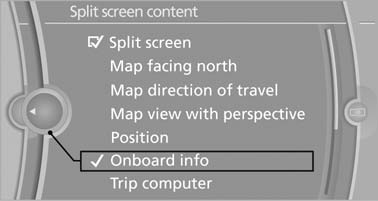
Select the desired menu item
See also:
Controls
Buttons at a glance
1 System on/off, interrupt
2 Resume speed
3 Store speed*
4 Store, maintain/change speed
Switching on
Press the button on the steering
wheel.
The marking in the speedom ...
Sound output
Switching on/off
When the ignition is switched off: press ON/OFF
button on the radio.
Muting
When the ignition is switched on or the engine
is running: press the ON/OFF button on the
radio. ...
Fuses
Notes
Replacing fuses
Never attempt to repair a blown fuse and
do not replace a defective fuse with a substitute
of another color or amperage rating; this could
lead to a circuit overload, ultim ...