
Detailed information on service requirements
More information on the scope of service required can be displayed on the Control Display.
1. "Vehicle Info"
2. "Vehicle status"
3.  "Service required"
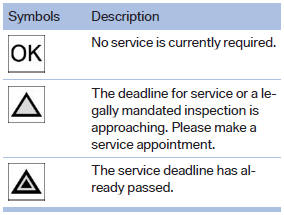
Required maintenance procedures and legally mandated inspections are displayed.
4. Select an entry to call up detailed information.
Symbols
See also:
Updating the navigation data
General information
Navigation data are stored in the vehicle and can
be updated.
Navigation data and authorization codes are
available from your service center.
▷ Depending on the data v ...
Malfunction
The warning lamp
comes on when the
system has failed.
A message appears on the Control
Display. More information ...
Country codes of DVDs
Your DVD player only plays DVDs with the coding
of your home region, e.g., Europe=2. The
country codes supported by your DVD are contained
in the information on your DVD.
An overview of the cod ...