
Language
Setting the language
To set the language on the Control Display:
1. "Settings"
2. "Language/Units"
3. "Language:"
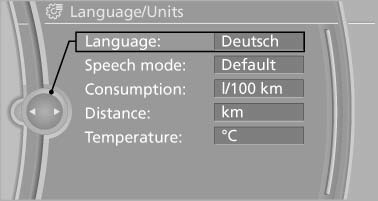
4. Select the desired language.
The setting is stored for the remote control currently in use.
Setting the voice dialog
Voice dialog for the voice activation system*.
See also:
What to do if...
Information on suitable mobile phones.
The mobile phone could not be paired or connected.
Is Bluetooth activated in the vehicle and on
the mobile phone? Activate Bluetooth in the
vehicle an ...
Calls with multiple parties
General information
You can switch between calls or connect two
calls to a single conference call. These functions
must be supported by the mobile phone and
service provider.
Accepting a call whi ...
Navigation
General information
Map
Split screen settings
Destination guidance with intermediate destinations
...