
Time
Setting the time zone
1. "Settings"
2. "Time/Date"
3. "Time zone"
4. Select the desired time zone. The time zone is stored.
Setting the time
1. "Settings"
2. "Time/Date"
3. "Time:"
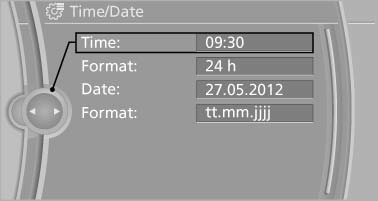
4. Turn the controller until the desired hours are displayed.
5. Press the controller.
6. Turn the controller until the desired minutes are displayed.
7. Press the controller. The time is stored.
Setting the time format
1. "Settings"
2. "Time/Date"
3. "Format:"
4. Select the desired format.
The time format is stored.
See also:
Shift paddles for Sport automatictransmission
The shift paddles on the steering wheel allow
you to shift gears quickly while keeping both
hands on the steering wheel.
If the shift paddles on the steering wheel are
used to shift gears in a ...
Voice operation
Vehicles equipped with the voice activation system:
operation.
Vehicles not equipped with the voice activation
system: depending on the equipment, the mobile
phone can be voice operated as desc ...
Fuel gauge
The vehicle inclination may
cause the display to vary.
Notes on refueling, refer to
page 234. ...