
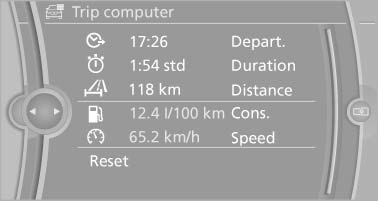
Trip computer
There are two types of computer.
- "Onboard info": the values can be reset as often as necessary.
- "Trip computer": the values provide an overview of the current trip.
Resetting the trip computer
1. "Vehicle Info"
2. "Trip computer"
3. "Reset": all values are reset. "Automatically reset": all values are reset approx. 4 hours after the vehicle comes to a standstill.
See also:
Vehicle equipment
All standard, country-specific and optional
equipment that is offered in the model series is
described in this chapter. Therefore, equipment
is also described that is not available in a vehicle, ...
In the Cabin
Because each was equipped with the optional Sport Package, both of our test
cars had "multi-contoured" power sport seats, which we found comfortable. An
additional seat adjustment, which ...
Loss of the remote controls
Lost remote controls can be blocked by your
service center. ...