
Opening the Options menu
 Press the button
The "Options" menu is displayed.
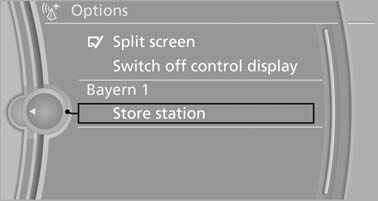
The "Options" menu is displayed
Additional options: move the controller to the right repeatedly until the "Options" menu is displayed.
Options menu
The "Options" menu consists of various areas:
▷ Screen settings, e.g., "Switch off control
display".
▷ Control options for the selected main menu,
e.g., for "Radio".
▷ If applicable, further operating options for
the selected menu, for instance "Store
station".
See also:
Operating from the inside
Via the button for the central locking system
If the vehicle is locked from the inside, the fuel
filler flap remains unlocked.
If an accident of a certain severity occurs, the
central locking sy ...
DTMF suffix dialing
DTMF suffix dialing can be used for gaining access
to network services or for controlling devices,
e.g., to make a remote inquiry of an answering
machine. The DTMF code is needed for this
purp ...
Settings
Vehicle
Equipment ...