
Changing between panels
After a menu item is selected, e.g., "Radio", a new panel is displayed. Panels can overlap.
▷ Move the controller to the left.
The current panel is closed and the previous
panel is displayed.
The previous panel is opened again by
pressing the BACK button. In this case, the
current panel is not closed.
▷ Move the controller to the right.
A new panel is opened on top of the previous
display.
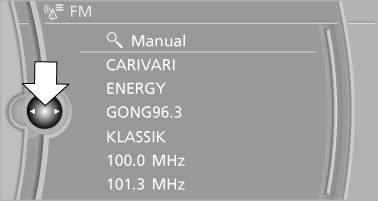
A new panel is opened on top of the previous
display
White arrows pointing to the left or right indicate that additional panels can be opened.
See also:
CD/Multimedia
CD/DVD drive
Music collection
External devices
Tone control ...
Instrument cluster
At a glance
1 Fuel gauge
2 Speedometer
3 Indicator/warning lamps
4 Tachometer
5 Engine oil temperature
6 Electronic displays
7 Reset miles ...
Text messages
Text messages at the upper edge of the Control
Display explain the meaning of the displayed indicator
and warning lamps. ...