
Comparison with ordinary remote control
The functions can be controlled by pressing the buttons or via Comfort Access.
Unlocking
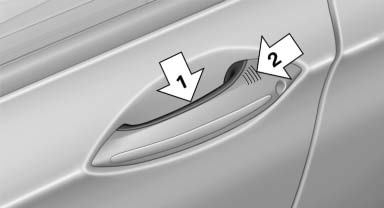
Fully grasp a door handle, arrow 1. This corresponds
to pressing the  button.
Locking
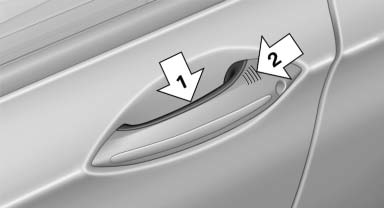
Press the area on the door handle, arrow 2, with your finger for approx. 1 second.
This corresponds to pressing the  button.
To save battery power, ensure that the ignition and all electronic systems and/or power consumers are switched off before locking the vehicle.
Convenient closing
Press the area, arrow 2, with your finger and hold.
In addition to locking, the windows and the glass sunroof* are closed.
 Monitor the closing process
Monitor the closing process to ensure that no one becomes trapped.
Unlocking the trunk lid separately
Press the button on the exterior of the trunk lid.
This corresponds to pressing the  button.
Do not place the remote control in the
cargo area
Take the remote control with you and do not leave it in the cargo area; otherwise, the remote control may be locked inside the vehicle when the trunk lid is closed.
See also:
Safety switch
The safety switch in the driver's door can be
used to prevent children, for example, from
opening and closing the rear windows using the
switches in the rear.
Switching on and off
Press the butt ...
Indicator/warning lamps
Indicator/warning lamps
The indicator and warning lamps can light up in
a variety of combinations and colors.
Several of the lamps are checked for proper
functioning and light up temporarily ...
Compatibility
If this symbol is printed on the
packaging
or in the instructions of the hand-held
transmitter, the remote-controlled device is
generally compatible with the integrated universal
remote con ...