
Controls
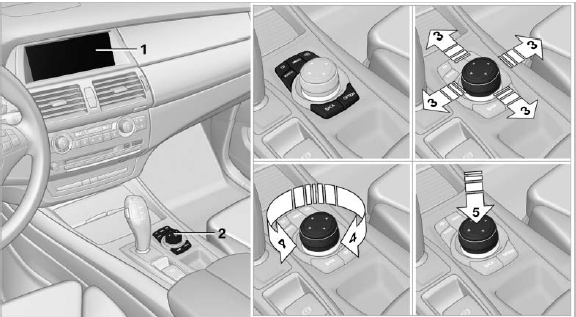
Controls
1. Control Display
2. Controller with buttons
The buttons can be used to open the menus directly. The controller can be used to select menu items and create the settings.
The buttons can be used to open the menus directly. The controller can be used to select menu items and create the settings.
▷ Move in four directions, arrow
▷ Turn, arrow
▷ Push, arrow
See also:
Automatic climate control
Comfortable interior climateAUTO program 7offers the ideal air distribution and air volume for almost
all conditions, refer to AUTO program below. All you need to do is select an interior
temperat ...
Removing ski bag
The ski bag can be completely removed, e.g., for
faster drying or to allow it to be put to other uses.
Removing ski bag
1. Pull the handle forward, arrow 1.
2. Take out the ski bag upward, arro ...
Avoiding unintentional alarms
The tilt alarm sensor and interior motion sensor
can be switched off together, such as in the following
situations:
▷ In automatic car washes.
▷ In duplex garages.
▷ During tr ...