
Automatic trunk lid operation
Opening
The trunk lid opens fully.
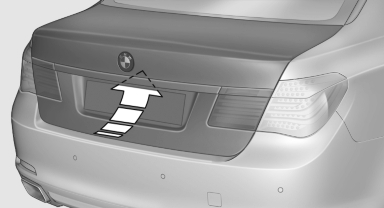
- Press the button on the exterior of the trunk lid.
 Press the button on the
remote
control or in the driver's footwell.
Press the button on the
remote
control or in the driver's footwell.
Pressing the button again stops the motion. The opening process is interrupted as well:
- When starting the engine.
- When the vehicle starts moving.
- By pressing the button in the driver's footwell.
- By pressing the button on the inside of the trunk lid.
Closing
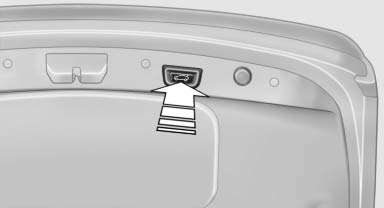
- Press the button on the inside of the trunk lid.
The trunk lid closes automatically.
Pressing again stops the motion.
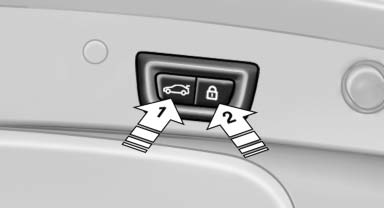
With Comfort Access:
- Press the button, arrow 1, on the inside of
the trunk lid.
The trunk lid closes automatically.
Pressing again stops the motion. - Press the button, arrow 2.
The trunk lid closes automatically and the vehicle is locked. - Press the button on the exterior of the trunk
lid.
Pressing again stops the motion.
The closing operation is interrupted:
- When starting the engine.
▷ The vehicle starts off with jerks.
 Danger of pinching
Make sure that the closing path of the trunk lid is clear; otherwise, injuries may result.
Do not place the remote control in the
cargo area
Take the remote control with you and do not leave it in the cargo area; otherwise, the remote control may be locked inside the vehicle when the trunk lid is closed.
Manual operation
If an electrical malfunction occurs:
1. Manually unlock the trunk lid.
2. Open or close the trunk lid slowly and smoothly.
See also:
Phone book
Displays
The phone book accesses the contacts and
shows all contacts for which a phone number
has been stored. The entries can be selected to
make a call.
1. "Telephone".
2. "P ...
Automatic headlamp control
Switch position : the low beams
are switched
on and off automatically, e.g., in tunnels, in twilight
or if there is precipitation. The indicator
lamp in the instrument cluster lights up.
A bl ...
Speed limit
Entry of a speed limit which, when reached,
should cause a Check Control message to be
issued.
Renewed warning if the vehicle speed drops below
the set speed limit once by at least 3 mph/
5 k ...