
Profile management
Opening the profiles
A different profile can be called up than the one associated with the remote control currently in use.
1. "Settings"
2. "Profiles"
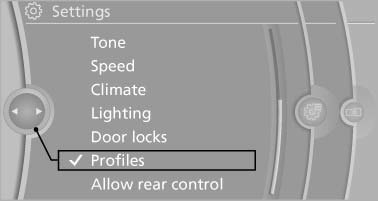
3. Select a profile.
The profile that is opened is assigned to the remote control currently in use.
Renaming profiles
1. "Settings"
2. "Profiles"
The current profile is selected.
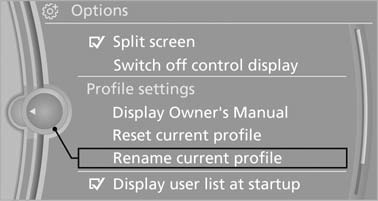
3. Open "Options".
4. "Rename current profile"
Resetting profiles
The settings of the active profile are reset to their default values.
1. "Settings"
2. "Profiles"
The current profile is selected.
3. Open "Options".
4. "Reset current profile"
Importing profiles
Existing settings and contacts are overwritten with the imported profile.
1. "Settings"
2. "Profiles"
3. "Import profile"
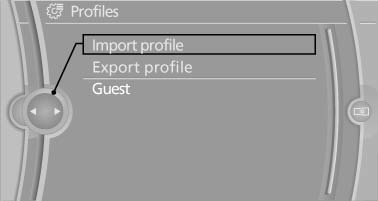
4. USB interface: "USB device"
Exporting profiles
Most settings of the active profile and the saved contacts can be exported.
This can be useful for storing and opening personal settings, for instance if settings are accidentally changed or deleted.
1. "Settings"
2. "Profiles"
3. "Export profile"
4. USB interface: "USB
device"
Using the guest profile
The guest profile can be used to make individual settings without affecting the three Personal Profiles.
This can be useful for drivers who are using the vehicle temporarily and do not have their own profile.
1. "Settings"
2. "Profiles"
3. The current profile is selected.
4. Open "Guest".
5. Create the settings.
Note: the guest profile cannot be renamed.
Display profile list during start
The profile list can be displayed during each start for selecting the desired profile.
1. "Settings"
2. "Profiles"
3. Open "Options".
4. "Display user list at startup"
See also:
Tow-starting
Automatic transmission
Do not tow-start the vehicle.
Due to the automatic transmission, the engine
cannot be started by tow-starting.
Have the cause of the starting difficulties remedied.
Manual ...
Calling up the desired speed and
distance
While driving
Press the button with the system
switched on.
In the following cases, the stored speed value is
deleted and cannot be called up again:
▷ When the system is switched off.
& ...
Child seat security
Child seat security
The rear safety belts
▷ BMW X5: all safety belts of the 2nd and 3rd row seats
▷ BMW X6: all safety belts of the 2nd row seats
And the safety belt for the front ...