
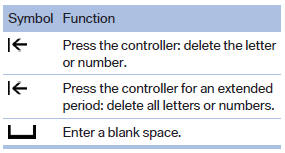
Entering letters and numbers
1. Turn the controller: select letters or numbers.
2. Select additional letters or numbers if needed.
3. "OK": confirm the entry.
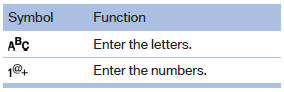
Switching between letters and numbers
Depending on the menu, you can switch between entering letters and numbers:
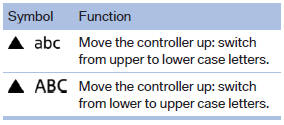
Switching between upper and lower case letters
Depending on the menu, you can switch between entering upper and lower case letters:
Entry comparison
Entry of names and addresses: the selection is narrowed down every time a letter is entered and letters may be added automatically.
The entries are continuously compared to the data stored in the vehicle.
- Only those letters are offered during the entry for which data is available.
- Destination search: town/city names can be entered using the spelling of language available on the Control Display.
See also:
Avoid high engine speeds
Use 1st gear to get the vehicle in motion. Beginning
with 2nd gear, accelerate rapidly. When
accelerating, shift up before reaching high engine
speeds.
When you reach the desired speed, shift i ...
Head airbags
In a lateral impact, the head airbag supports the
head. ...
Distance
Selecting a distance
Adjust the distance according to the traffic
and weather conditions; otherwise, there is the
danger of an accident occurring. Maintain the
prescribed safety distance.
...