
Changing between panels
After a menu item is selected, e.g., "Radio", a new panel is displayed. Panels can overlap.
▷ Move the controller to the left.
The current panel is closed and the previous panel is displayed.
The previous panel is opened again by pressing the BACK button. In this case, the current panel is not closed.
▷ Move the controller to the right.
A new panel is opened on top of the previous display.
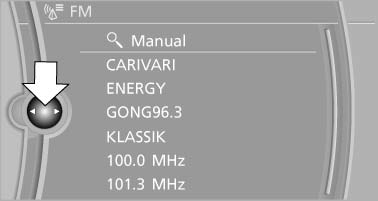
White arrows pointing to the left or right indicate that additional panels can be opened.
See also:
Reminders
Displaying reminders
Reminders of pending appointments and tasks
are displayed. After an appointment or after a
task is due, the reminder is no longer displayed.
1. "Office"
2. " ...
BMW 3-Series production at the company's home plant in Munich
Like each of its predecessors since 1975, the new BMW 3-Series will be built
at BMW Plant Munich. The company's home plant lies at the centre of the
sprawling Bavarian city and represents the hear ...
Drive-off assistant
The drive-off assistant enables you to drive off smoothly on uphill gradients.
It is not necessary to use the parking brake for this.
1. Hold the car in place by depressing the brake.
2.&nbs ...