
All around the steering wheel
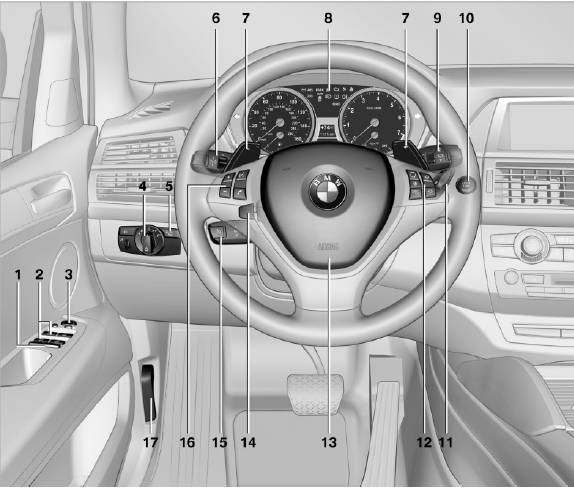
All around the steering wheel
1. Rear window safety switch
2. Power windows
3. Exterior mirror operation
4. Lamps
 Instrument lighting
 Front fog lamps
 Parking lamps
 Low beams
 Automatic headlamp control
Adaptive light control
High-beam Assistant
5.  Head-up Display
6. Steering column stalk, left
 Turn signal
 High beams, headlamp
flasher
High beams, headlamp
flasher
 High-beam Assistant
 Roadside parking lamps
 Computer
 Settings and information about the
vehicle
Settings and information about the
vehicle
7. BMW X6: shifting up or down with automatic transmission
8. Instrument cluster
9. Steering column stalk, right
 Windshield wipers
 Rain sensor
 BMW X5: rear window wipers
10.  Start/stop the engine and
switch
the ignition on/off
Start/stop the engine and
switch
the ignition on/off
11. Ignition lock
12. Steering wheel buttons, right
 Change the radio station
Stopping a traffic announcement
 Select a music track
Scrolling through the redial list
 Next entertainment source
 Recirculated-air mode
 Steering wheel heating
 Lane departure warning
13. Horn, the entire surface
14. 
15. Cruise control lever
 Cruise control
 Active cruise control
16. Steering wheel buttons, left
 Telephone
 Volume
 Activate/deactivate the voice
activation system
Activate/deactivate the voice
activation system
17. Releasing the hood
See also:
Executing functions using short commands
Functions on the main menu can be performed
directly by means of short commands, nearly irrespective of which menu item is
currently selected,
e.g., ›Vehicle status‹.
List of short commands of ...
Opening the DVD-specific menu
Additional functions may be available on DVDs.
It is thus possible, for example, to select from
among several possible actions or to access information
about the film.
1. Press the button on th ...
At a glance
General information
Contacts, appointments, tasks, notes, text messages,
and e-mails from the mobile phone can
be displayed on the Control Display if the mobile
phone provides compatible suppor ...