
Received calls
Displaying calls
The 20 calls that were last received are displayed.
1. "Telephone"
2. "Received calls"
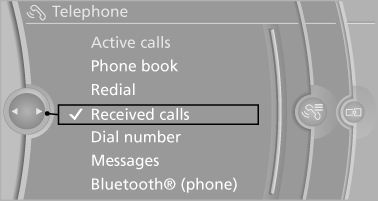
Calling a number from the list
Selecting an entry.
The connection is established.
Deleting a single entry or all entries
The erasure of entries depends on the mobile phone.
1. Highlight the entry.
2. Open "Options".
3. "Delete entry" or"Delete list"
Saving an entry in the contacts
1. Highlight the entry.
2. Open "Options".
3. "Store as new contact" or "Add to existing
contact"
4. Select the contact, if necessary
5. Select the type of number: "Home",
"Business", "Mobile" or "Other"
6. Complete the entries if necessary.
7. "Store contact"
See also:
Capacities
...
Equalizer
Setting for individual audio frequency ranges.
Adjusting the equalizer
1. "CD/Multimedia", "Radio" or "Settings"
2. "Tone"
3. "Equalizer"
4. Sele ...
Ventilation
Front ventilation
► Lever for changing the air flow direction, arrow 1.
► Thumbwheels for opening and closing the
vents continuously, arrows 2.
► Thumbwheel to vary the tempera ...