
Phone book
Displays
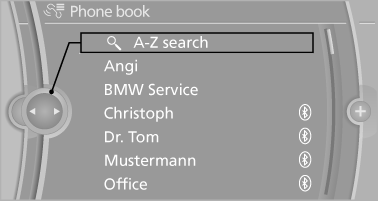
The phone book accesses the contacts and shows all contacts for which a phone number has been stored. The entries can be selected to make a call.
1. "Telephone"
2. "Phone book"
A symbol indicates the storage location of the contacts.
Calling a contact
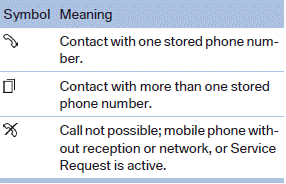
For contacts with one stored phone number: select the required contact. The connection is established.
For contacts with more than one stored phone number: select the required contact and the phone number. The connection is established.
Editing a contact
Changing the entries in "Contacts". When a contact is changed, the changes are not stored on the mobile phone. A copy of the entry is stored in the vehicle.
1. Highlight the contact.
2. Open "Options".
3. "Edit entry"
The contact can be edited.
See also:
Switching off the engine
Procedure
1. Engage transmission position P with the vehicle
stopped.
2. Press the Start/Stop button.
3. Set the parking brake.
4. Remove the remote control from the ignition
lock
Before driv ...
System limits
Check the traffic situation as well
PDC cannot serve as a substitute for the
driver's personal judgment of the traffic situation.
Check the traffic situation around the vehicle
with your own ey ...
Controls
Buttons at a glance
1 System on/off, interrupt
2 Resume speed
3 Store speed*
4 Store, maintain/change speed
Switching on
Press the button on the steering
wheel.
The marking in the speedom ...