
Software Update
The vehicle supports various external devices depending on the current software version. With a software update, the vehicle can support new cell phones or new external device, for example.
The updating of the software is done via:
► USB.
Updates and related current information is available at www.bmw.com/update.
Displaying the current version
The currently installed software is displayed.
1. "Settings"
2. "Software update"
3. "Show current version"
SelectDesired version to displayAdditional information.
Updating software via USB
The software may only be updated when the vehicle is stationary.
1. Store the file for the software-update in the
main director of a USB flash drive.
2. Insert the USB flash drive into the USB interface
of the USB audio interface in the
center armrest. An update via the USB interface
in the glove compartment is not possible.
3. "Settings"
4. "Software update"
5. "Update software"
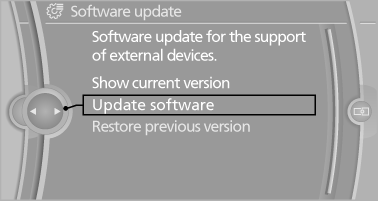
6. "Start update"
7. "OK"
All listed software updates are installed.
Restoring the previous version
The software version before the last software update can be restored.
The previous version may only be restored when the vehicle is stationary.
1. "Settings"
2. "Software update"
3. "Restore previous version"
4. "OK" Double-click.
All listed software updates are removed.
Note
While the software is being updated or a previous version is being restored, BMW Assist, Office functions and the connected devices are temporarily unavailable. Wait several minutes for the functions to become available again.
See also:
Entering an address using a command
1. Press the
button on the steering
wheel.
2. Enter address
3. Wait for a request from the system.
4. Say the address in the suggested order.
5. Continue making the entry as prompted by
the ...
Automatic deactivation during forward travel
The system switches off when a certain driving
distance or speed is exceeded.
Switch the system back on if necessary. ...
Closing the hood
Let the hood drop from a height of approx. 16 in/
40 cm and push down on it to lock it fully.
The hood must audibly engage on both sides.
Hood open when driving
If you see any signs that the h ...