
Stored stations
General information
It is possible to store up to 40 stations.
Calling up a station
1. "Radio"
2. "Presets"
3. Select the desired station.
Storing a station
The station currently selected is stored.
1. "Radio"
2. "Presets"
3. "Store station"
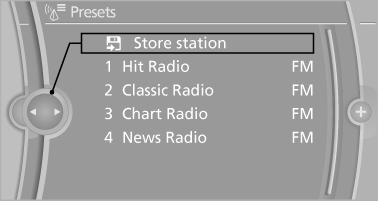
4. Select the desired memory location.
The list of stored stations is stored for the remote control currently in use.
The stations can also be stored on the programmable memory buttons.
Deleting a station
1. "Radio"
2. "Presets"
3. Select the desired station.
4. "Options" Open.
5. "Delete entry"
See also:
Entering appointment dates
Enter the dates for the required inspections.
Ensure that the vehicle date and time are set
correctly.
1. "Vehicle Info"
2. "Vehicle status"
3. "Service required"
...
Hydroplaning
On wet or slushy roads, a wedge of water can
form between the tires and road surface.
This phenomenon is referred to as hydroplaning.
It is characterized by a partial or complete
loss of contact ...
Airbags
The following airbags are located under the marked covers:
1. Front airbags
2. Coupe: head airbags
3. Side airbags in the seat backrests
4. Convertible: knee airbags
Pro ...