
Volume
► "Speed volume": speed-dependent volume
control.
► "PDC": volume of the PDC signal compared
to the entertainment sound output.
► "Gong": volume of the signal, e. g., the safety
belt reminder, compared to the entertainment
sound output.
► "Microphone": volume of the microphone
during a phone call.
► "Loudspeak.": volume of the loudspeakers
during a phone call.
The following volumes are only stored for the
respective paired telephone: "Microphone",
"Loudspeak.".
Adjusting the volume
1. "CD/Multimedia", "Radio" or "Settings"
2. "Tone"
3. "Volume settings"
4. Select the desired volume setting.
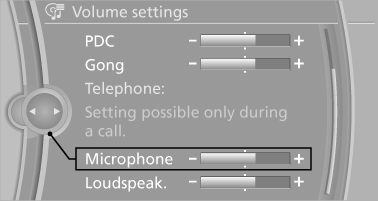
5. To adjust: turn the controller.
6. To store: press the controller.
See also:
The concept
Personal Profile concept
You can set several of your vehicle's functions
to suit your personal needs and preferences.
The settings are automatically saved in the
profile currently activated. ...
Cargo area
Net
Smaller objects can be stored in the net on the
side of the cargo area.
To transport larger objects, it can be pushed
down.
Storage compartment under the cargo
floor panel
Raise the ca ...
Automatic-Transmission
Switching off the engine
1. Engage transmission position P with the vehicle
stopped.
2. Press the Start/Stop button.
The engine is switched off.
The radio ready state is switched on.
3. Set th ...