
Multi-channel playback,surround
Choose between stereo and multi-channel playback, surround.
Setting multi-channel playback, surround
1. "CD/Multimedia", "Radio" or "Settings"
2. "Tone"
3. "Surround"
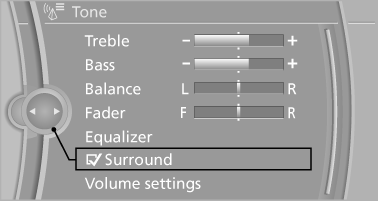
When surround is activated, multi-channel playback is simulated when a stereo audio track is played.
See also:
Office
...
Hiding Check Control messages
Press the computer button on the turn signal
lever.
► Some Check Control messages are displayed
continuously and are not cleared until
the malfunction is eliminated. If several
malfunct ...
Lumbar support
The curvature of the seat backrest can be adjusted
in such a way that it supports the lumbar
region of the spine. The lower back and the
spine are supported for upright posture.
Press the ...