
Securing cargo
Lashing eyes in the cargo area
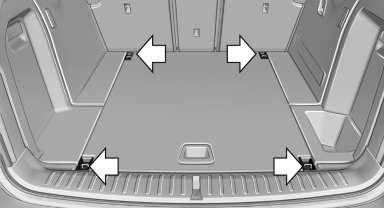
To secure the cargo, there are four lashing eyes in the cargo area
Lashing eyes in the cargo area with rails
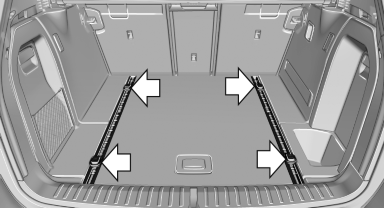
To secure the cargo, there are four movable lashing eyes in the cargo area
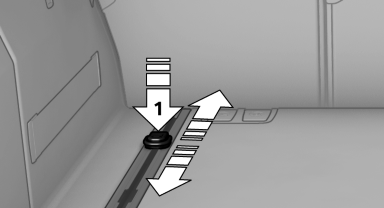
To slide the lashing eyes, press the button, arrow 1. Make sure that the lashing eyes latch at the new position.
If available, the lashing eyes are located under the cargo floor cover in the cargo area. They can be inserted into the openings in the rails.
Cargo net, FlexNet
The flexible cargo net is hooked into eyes and secures the cargo in the cargo area. The storage net can be attached to the following eyes:
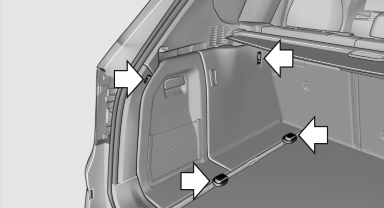
► Lashing eyes on the rail system.
► Eyes on the cargo area wall.
The eyes are located on both sides of the cargo area.
Securing cargo
► Smaller and lighter items: secure with retaining
straps or with a cargo net or draw
straps.
► Larger and heavy objects: secure with cargo
straps.
Cargo straps, cargo netting, retaining straps or draw straps on the lashing eyes in the cargo area.
 Securing cargo
Always position and secure the cargo as
described above; otherwise, it can endanger the
car's occupants if sudden braking or swerving
becomes necessary.
Heavy or hard objects should not be carried
loose inside the car; otherwise, they could be
thrown around as a result of hard braking, sudden
swerves, etc., and endanger the occupants.◄
See also:
Speed limit
Display of a speed limit which, when reached,
should cause a warning to be issued.
Renewed warning if the vehicle speed drops below
the set speed limit once by at least 3 mph/
5 km/h.
Displayi ...
Deleting contacts
1. "My contacts"
2. Highlight the contact.
3. Open "Options".
4. "Delete contact" or "Delete all contacts" ...
Functional requirements
The system must have been reset while the inflation
pressure was correct; otherwise, reliable
signaling of a flat tire is not ensured.
Always use wheels with TPM electronics to ensure
that the ...