
Increasing or decreasing vehicle speed
Specify desired speed in the range from approx.
4 mph/6 km/h to approx. 15 mph/25 km/h using the rocker switch of the cruise control on the steering wheel. Vehicle speed can be changed by lightly accelerating.
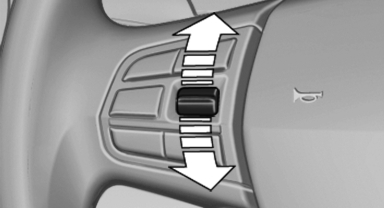
► Press up the rocker switch to the point of
resistance: the speed increases gradually.
► Press up the rocker switch past the point of
resistance: the speed increases while the
rocker switch is pressed.
► Press down the rocker switch to the point of
resistance: the speed decreases gradually.
► Press down the rocker switch past the point
of resistance: when driving forward, the
speed decreases to approx. 6 mph/10 km/h;
when reversing, the speed decreases to approx.
4 mph/6 km/h.
See also:
System limits
Personal responsibility
The system cannot serve as a substitute
for the driver's personal judgment of the traffic
situation.
In the event of a warning, do not jerk the steering
wheel, as you ...
Contacts
Note
If equipped with full mobile phone preparation
package.
At a glance
Contacts can be created and edited. The contacts
from the mobile phone are displayed as
well if this function is supporte ...
Tire Identification Number
Tires with DOT codes meet the guidelines of the
U.S. Department of Transportation.
DOT code:
DOT xxxx xxx 3410
xxxx: manufacturer code for the tire brand
xxx: tire size and tire design
3410: ti ...