
Language
Setting the language
To set the language on the Control Display:
1. "Settings"
2. "Language/Units"
3. "Language:"
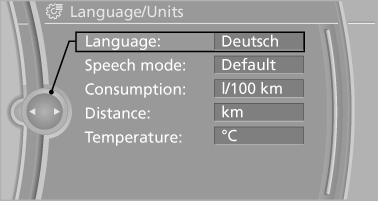
4. Select the desired language.
The setting is stored for the remote control currently in use.
Setting the voice dialog
Voice dialog for the voice activation system, refer to page 23.
See also:
Indication of a flat tire
The yellow warning lamp lights
up. A
Check Control message is displayed.
There is a flat tire or a major loss in tire
inflation pressure.
1. Reduce your speed and stop cautiously.
Avoid ...
xDrive*
xDrive is the all-wheel-drive system of your vehicle.
Concerted action by the xDrive and DSC
further optimize traction and driving dynamics.
The xDrive all-wheel-drive system variably distribute ...
Calendar
Display the calendar
Appointments during the last 20 and the next 50
days can be displayed.
1. "Office"
2. "Calendar"
The appointments on the current day are
displayed.
Se ...