
Speed limit
Display of a speed limit which, when reached, should cause a warning to be issued.
The warning is repeated if the vehicle speed drops below the set speed limit once by at least 3 mph/5 km/h.
Displaying, setting or changing the limit
1. "Settings"
2. "Speed"
3. "Warning at:"
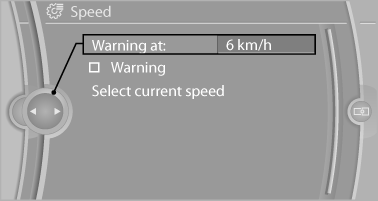
4. Turn the controller until the desired limit is
displayed.
5. Press the controller.
The speed limit is stored.
Activating/deactivating the limit
1. "Settings"
2. "Speed"
3. "Warning"
4. Press the controller.
Applying your current speed as the limit
1. "Settings"
2. "Speed"
3. "Select current speed"
4. Press the controller.
The current vehicle speed is stored as the limit.
See also:
Vehicle equipment
All standard, country-specific and optional
equipment that is offered in the model series is
described in this chapter. Therefore, equipment
is also described that is not available in a vehicle,
e ...
Displaying contacts
General information
1. "Office"
2. "Contacts"
All contacts are listed in alphabetical order. Depending
on the number of contacts, an A-Z
search is offered.
A symbol indic ...
Following the initial pairing
► The mobile phone is detected/connected in
the vehicle within a short period of time
when the engine is running or the ignition is
switched on.
► The phone book entries of the telepho ...