
Entering letters and numbers
General information
1. Turn the controller: select letters or numbers.
2. Select additional letters or numbers if
needed.
3. "OK": confirm the entry.
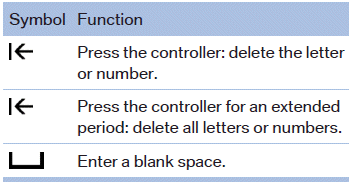
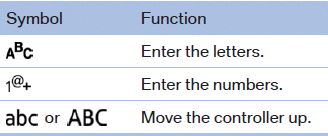
Switching between cases, letters and numbers
Depending on the menu, you can switch between entering upper and lower case, letters and numbers:
Entry comparison
Entry of names and addresses: the selection is narrowed down every time a letter is entered and letters may be added automatically.
The entries are continuously compared to the data stored in the vehicle.
► Only those letters are offered during the entry
for which data is available.
► Destination search: town/city names can be
entered using the spelling of language available
on the Control Display.
See also:
Data transfer
During the updating of BMW services, display
the status of the data transfer.
1. "BMW Assist" or "ConnectedDrive"
2. "Options" Open.
3. "Data transfer" ...
Switching on/off directly
1. "Settings"
2. "Climate"
3. "Activate parked-car vent."
Switching on/off directly
The symbol on the automatic
climate control
flashes if the system is switc ...
The concept
Adaptive light control is a variable headlamp
control system that enables dynamic illumination
of the road surface.
Depending on the steering angle and other parameters,
the light from the head ...