
Example: setting the clock
Setting the clock
1.  Press the button. The main
menu is
displayed.
Press the button. The main
menu is
displayed.
2. Turn the controller until "Settings" is highlighted,
and then press the controller.
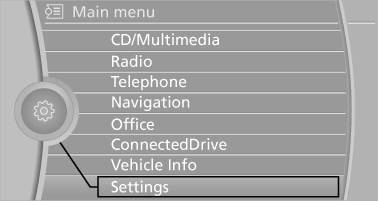
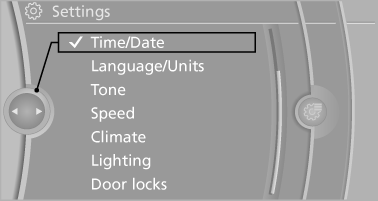
3. If necessary, move the controller to the left
to display "Time/Date".
4. Turn the controller until "Time/Date" is highlighted,
and then press the controller.
5. Turn the controller until "Time:" is highlighted, and then press the controller.
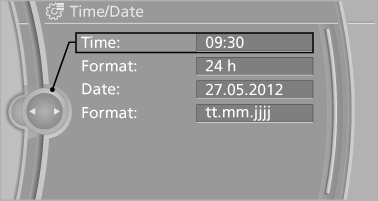
6. Turn the controller to set the hours and
press the controller.
7. Turn the controller to set the minutes and
press the controller.
See also:
Malfunction
In the event of a failure or malfunction of the
parking brake, secure the vehicle against rolling
using a wheel chock, for example, when leaving
it. ...
2009 BMW 750 Review by Mike Hanley
When a redesigned 7 Series debuted for the 2002 model year, it was one of the
most controversial cars in recent history. Not only did it signal a new design
direction for BMW that rubbed many peop ...
Vehicle equipment
All standard, country-specific and optional
equipment that is offered in the model series is
described in this chapter. Therefore, equipment
is also described that is not available in a vehicle, ...