
Changing between panels
After a menu item is selected, e.g., "Radio", a new panel is displayed. Panels can overlap.
► Move the controller to the left.
The current panel is closed and the previous panel is displayed.
The previous panel is opened again by pressing the BACK button. In this case, the current panel is not closed.
► Move the controller to the right.
A new panel is opened on top of the previous display.
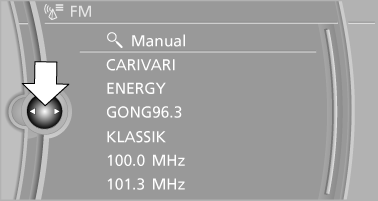
White arrows pointing to the left or right indicate that additional panels can be opened.
See also:
Image on the Control Display
Switching on the rear view camera
using iDrive
With Top View activated:
"Rear
view camera"
The image of the rear view camera is displayed.
The setting is stored for the ...
Changing, maintaining, and storing the speed
The rocker switch can be pressed while the system
is interrupted to maintain and store the current
speed. DSC Dynamic Stability Control is
switched on, if necessary.
Adapting the desired s ...
Vehicle Overview
Redesigned for 2011, the sixth-generation 5 Series offers a longer wheelbase,
better fuel efficiency and more conventional styling than its predecessor.
Available in 528i, 535i and 550i trims, the ...