
My contacts
General information
List of all contacts stored in the vehicle.
Displaying contacts
1. "Contacts"
2. "My contacts"
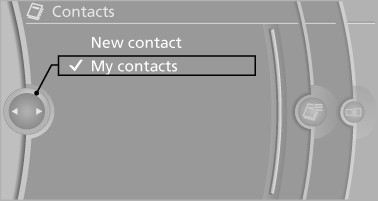
All contacts are listed in alphabetical order. Depending on the number of contacts, an A-Z search is offered
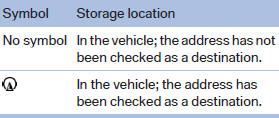
A symbol indicates the storage location of the contacts:
Editing a contact
1. Select the desired contact.
2. "Edit contact"
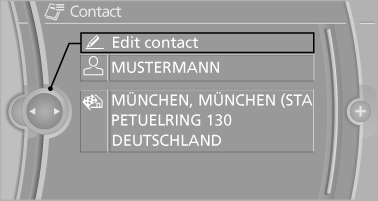
3. Change the entries.
4. Move the controller to the left.
5. "Yes"
Selecting the contact as a navigation destination
1. Select the desired contact.
2. Select the address.
3. "Start guidance" or "Add as another
destination"
Checking the address as a destination
An address that is to be used for destination guidance must match the navigation data contained in the vehicle. The address can be checked for this purpose.
1. Select the desired contact and highlight the
address.
2. "Options" Open.
3. "Check as destination"
4. Correct and store the address if necessary
Selecting the sorting order of the names
Names can be displayed in a different order.
1. "My contacts"
2. "Options" Open.
3. "Display: last, first name" or "Display: first,
last name"
Exporting/importing contacts
Contacts can be exported and imported via the Personal Profile
Deleting contacts
1. "My contacts"
2. Highlight the contact.
3. "Options" Open.
4. "Delete contact" or "Delete all contacts"
See also:
Lighter
Lighter
With the engine running or the ignition switched
on, press in the cigarette lighter.
The lighter can be removed as soon as it pops
back out.
Danger of burns
Only hold the hot light ...
Switching on/off manually
Switching on/off manually
Press the button.
▷ On: the LED lights up.
▷ Off: the LED goes out.
If Top View is displayed, switch on the backup
camera via the iDrive. ...
Perfect handling: high-quality suspension technology, even weight
distribution and improved stability control
The new BMW 1-Series boasts best-in-class suspension technology, with a
double-joint cross-strut front axle with McPherson struts and sway bars, and a
five-link rear axle. The high aluminium conte ...