
New contact
1. "Contacts"
2. "New contact"
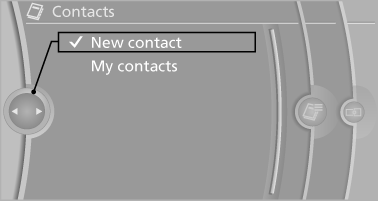
3. The entry fields are still filled with the previous
entries: "Delete input fields"
4. Fill in the entry fields: select the symbol next
to the entry field.
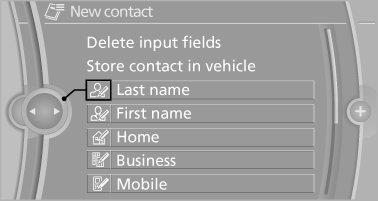
5. Enter the text.
6. If the vehicle is equipped with a navigation
system: Enter the address. Only addresses
contained in the navigation data in the vehicle
can be entered. This ensures that destination
guidance is possible for all addresses.
7. If necessary, "Store".
8. "Store contact in vehicle"
Specifying the home address
A home address can be stored. It appears at the top of the contact list.
1. "Home"
2. Create a contact.
3. "Store contact in vehicle"
See also:
Compartments in the doors
Do not stow any breakable
objects
Do not store any breakable objects, e. g.
glass bottles, in the compartments, or there is
an increased risk of injury in the event of an accident. ...
Opening the Options menu
Press the button.
The "Options" menu is displayed.
Additional options: move the controller to the
right repeatedly until the "Options" menu is displayed.
Options menu
The ...
Compact Design
Just as BMW's compact 3 Series ranks below the midsize 5 Series, the
five-seat X3 sits in the shadow of the larger X5. The styling clearly says BMW,
but it's the multi-paneled look of earlier mode ...