
Calendar
Display the calendar
Appointments during the last 20 and the next 50 days can be displayed.
1. "Office"
2. "Calendar"
The appointments on the current day are displayed
Selecting the calendar day
1. Select the date.
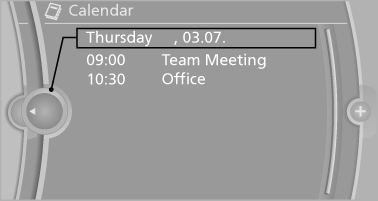
2. Select the desired day or date.
▷ "Next day"
▷ "Date:"
▷ "Previous day"
▷ "Today"
Display the appointment
1. Select the desired appointment.
2. Scroll through the appointment if necessary:
▷ Turn the controller.
▷ 
 Select the symbol.
Using contact data
Contact data from appointments, tasks, text messages, e-mails and notes can be saved or selected
Reading the appointment out loud
Read the appointment out loud
See also:
Hot exhaust system
Hot exhaust system
High temperatures are generated in the
exhaust system.
Do not remove the heat shields installed and
never apply undercoating to them. Make sure
that flammable materials, e ...
Brightness
Setting the brightness
To set the brightness of the Control Display:
1. "Settings"
2. "Control display"
3. "Brightness"
4. Turn the controller until the desired br ...
Message from the Concierge service
Storing an address
1. Select the desired message.
2. "Options" Open.
3. "Store contact in vehicle"
Selecting additional functions
Additional functions are available when a mes ...