
Snap-in adapter
General information
Detailed information about snap-in adapter, which supports the functions of the mobile phone, available from the service center.
Notes
At high temperatures, the charge function of the mobile phone can be limited where appropriate and the functions are no longer executed.
When the mobile phone is used via the vehicle, heed the operating manual of the mobile phone.
Installation position
In the center armrest.
Inserting the snap-in adapter
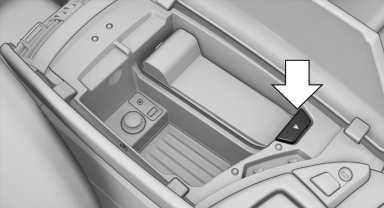
1. Press the button and remove the cover.
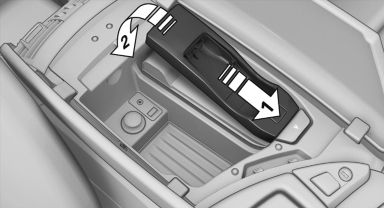
2. Insert the snap-in adapter at the front, arrow 1, and press down, arrow 2, until it engages.
Inserting the mobile phone
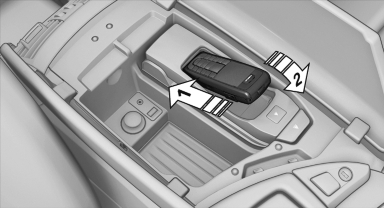
1. Depending on the mobile phone, remove
the protective cap from the antenna connector
and from the USB connection of the
mobile phone.
2. Slide the mobile phone with the buttons facing
up in the direction of the electrical connections,
arrow 1, and push downward, arrow
2 until it engages.
Removing the mobile phone
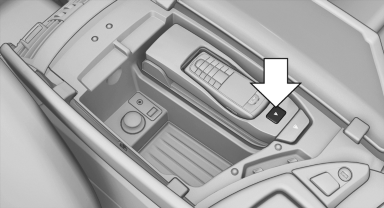
Press the button and remove the mobile phone.
See also:
Controls
Buttons at a glance
1 System on/off, interrupt
2 Resume speed
3 Store speed*
4 Store, maintain/change speed
Switching on
Press the button on the steering
wheel.
The marking in the speedom ...
Parked car ventilation
The conceptThe parked car ventilation provides ventilation to the passenger compartment
and lowers its temperature, if necessary.
The parked car ventilation system is operated via iDrive. Two diffe ...
The concept
The DTC system is a version of the DSC in which
forward momentum is optimized.
The system ensures maximum forward momentum
on special road conditions, e.g., unplowed
snowy roads, but driving st ...