
Additional functions
Activating/deactivating the additional functions
Activate the functions before pairing to be able to use them in the vehicle. Information on suitable mobile phones, that support these functions.
1. "Telephone"
2. "Bluetooth® (phone)"
3. "Options" Open.
4. "Configure Bluetooth®"
5. Select the desired additional function.
▷ "Additional telephone"
▷ "Office"
▷ "Bluetooth® audio"
6. "OK"
As long as an additional function is deactivated,
it cannot be assigned to a telephone.
Additional telephone
A mobile phone can be used as an additional telephone.
The additional telephone can be used to accept incoming calls. While a call is active on the additional telephone, incoming calls are displayed on the Control Display.
Audio source
A mobile phone can be used as an audio source.
Pairing and connecting cell phone
 Pairing the mobile phone
To avoid becoming distracted and posing
an unnecessary hazard both to your own vehicle's
occupants and to other road users, only
pair the mobile phone while the vehicle is stationary.◀
Pair the vehicle entirely on the front or rear Control Display.
1. "Telephone"
2. "Bluetooth® (phone)"
3. "Add new phone"
The Bluetooth name of the vehicle is displayed.
4. To perform additional steps on the mobile
phone, refer to the mobile phone operating
instructions: e.g. search for or connect the
Bluetooth device or a new device.
The Bluetooth name of the vehicle appears
on the mobile phone display.
5. Select the Bluetooth name of the vehicle on
the mobile phone display.
Prompt via iDrive or the mobile phone to enter
the same Bluetooth passkey.
6. Enter the passkey and confirm.<>
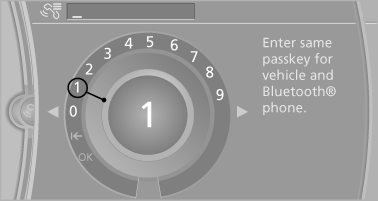
7. Select the functions for which the mobile
phone is to be used.
8. "OK"
If the pairing was successful, the mobile phone appears at the top of the list of mobile phones.
The functions supported by the mobile phone and audio device are displayed as symbols when paired.
White symbol: the function is active.
Gray symbol: the function is inactive.
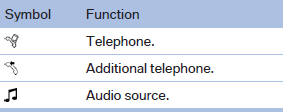
Four mobile phones can be paired with the vehicle at once. Three mobile phones can be connected with the vehicle at once.
If pairing was unsuccessful: What to do if...
See also:
In the center armrest in the rear
Storage is possible in a vertical or horizontal position
in the center armrest. ...
Approved mobile phones
Details on which mobile phones and external
devices with a Bluetooth interface are supported
by the mobile phone preparation package
can be obtained at www.bmwusa.com/bluetooth.
Displaying the ...
Features
The 2009 X3 starts at $39,700 and comes standard with leatherette upholstery,
eight-way power front seats, a panoramic moonroof and rain-sensing windshield
wipers. There are four option packages a ...