
Controls
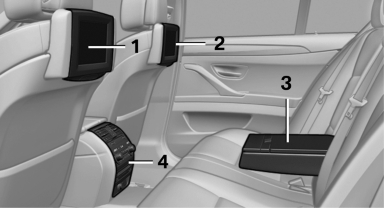
1 Screen, left
2 Screen, right
3 Center armrest, remote control
4 CD/DVD player
See also:
Activation/deactivation
Press the button. ...
Roller sunblind for rear window
General information
If you are no longer able to move the roller sunblind
for the rear window after having activated
it a number of times in a row, the system is
blocked for a limited time to p ...
Radio
FM
AM
Satellite radio
Stored stations
...