
Stored stations
General information
It is possible to store up to 40 stations.
Calling up a station
1. "Radio"
2. "Presets"
3. Select the desired station.
Storing a station
The station currently selected is stored.
1. "Radio"
2. "Presets"
3. "Store station"
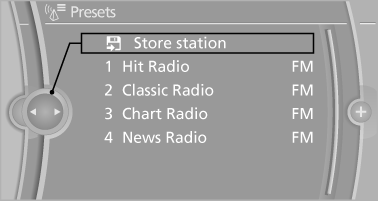
4. Select the desired memory location.
The list of stored stations is stored for the remote control currently in use.
The stations can also be stored on the programmable memory buttons
Deleting a station
1. "Radio"
2. "Presets"
3. Select the desired station.
4. "Options" Open.
5. "Delete entry"
See also:
Starting destination guidance
1. "Navigation"
2. Enter the destination.
3. "Accept destination"
4. "Start guidance"
► The route is shown on the Control Display.
► The distance to the ...
At a glance
These overviews of buttons, switches and
displays are intended to familiarize you with your
vehicle. You will also become quickly acquainted
with the available control concepts and options. ...
Controls
Almost all functions can be operated in the same
manner as they are in the front. Special features
of operating the system in the rear are described
here. ...