
Controls
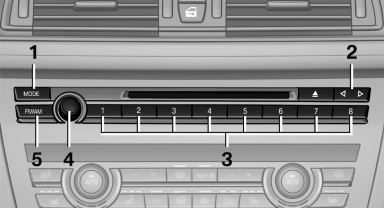
1. Change entertainment sources
2. Change station/track
3. Programmable memory buttons
4. Volume, on/off
5. Change wave band
See also:
Children on the front passenger seat
Should it ever be necessary to use a child restraint
fixing system in the front passenger seat,
make sure that the front, knee and side airbags
on the front passenger side are deactivated. Autom ...
The concept
The system is functional at speeds beginning at
approx. 20 mph/30 km/h.
It maintains the speed that was set using the
control elements on the steering wheel.
The system brakes on downhill gradie ...
Notes
Displaying notes
1. "Office".
2. "Notes".
All notes are displayed.
Displaying the note
1. Select the desired note.
2. Scroll in the note if necessary:
▷ Turn the con ...