
Tone
Vehicle equipment
All standard, country-specific and optional equipment that is offered in the model series is described in this chapter. Therefore, equipment is also described that is not available in a vehicle, e. g., because of the selected optional equipment or country variant. This also applies for safety-related functions and systems.
General information
The sound settings are stored for the remote control currently in use.
Treble, bass, balance, and fader
▷ "Treble": treble adjustment.
▷ "Bass": depth adjustment.
▷ "Balance": left/right volume distribution.
▷ "Fader": front/rear volume distribution.
Setting treble, bass, balance, and fader
1. "CD/Multimedia", "Radio" or "Settings"
2. "Tone"
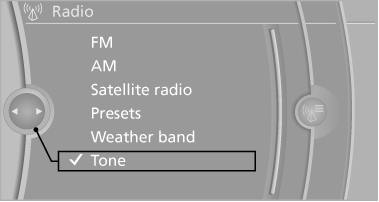
3. Select the desired tone settings.
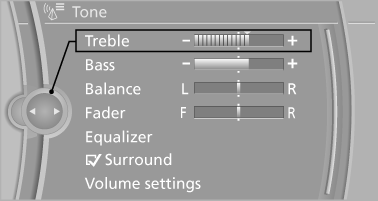
4. To adjust: turn the controller.
5. To store: press the controller.
Equalizer
Setting for individual audio frequency ranges.
Adjusting the equalizer
1. "CD/Multimedia", "Radio" or "Settings"
2. "Tone"
3. "Equalizer"
4. Select the desired setting.
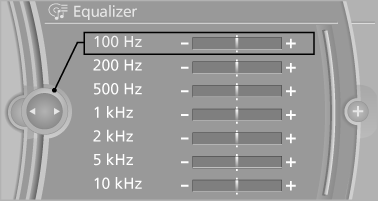
5. To adjust: turn the controller.
6. To store: press the controller.
Multi-channel playback, surround
Choose between stereo and multi-channel playback, surround.
Setting multi-channel playback, surround
1. "CD/Multimedia", "Radio" or "Settings"
2. "Tone"
3. "Surround"
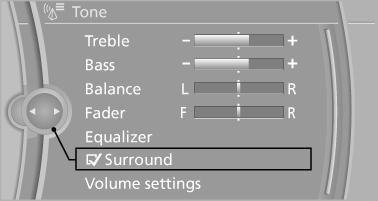
When surround is activated, multi-channel playback is simulated when a stereo audio track is played.
Volume
▷ "Speed volume": speed-dependent volume
control.
▷ "PDC": volume of the PDC signal compared
to the entertainment sound output.
▷ "Gong": volume of the signal, e. g., the safety
belt reminder, compared to the entertainment
sound output.
▷ "Microphone": volume of the microphone
during a phone call.
▷ "Loudspeak.": volume of the loudspeakers
during a phone call.
The following volumes are only stored for the respective paired telephone: "Microphone", "Loudspeak.".
Adjusting the volume
1. "CD/Multimedia", "Radio" or "Settings"
2. "Tone"
3. "Volume settings"
4. Select the desired volume setting.
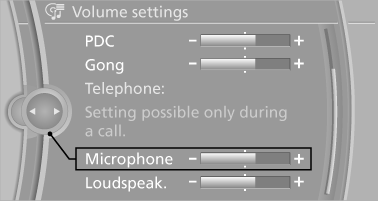
5. To adjust: turn the controller.
6. To store: press the controller.
Resetting the tone settings
1. "CD/Multimedia", "Radio" or "Settings"
2. "Tone"
3. "Reset"
See also:
Continuing destination
guidance
If the destination was not reached during the last
trip, destination guidance can be resumed.
"Resume guidance" ...
Switching off automatically
The system switches off and the LED goes out:
▷ After approx. 165 ft/50 m when driving forward.
▷ After approx. 22 mph/35 km/h when driving
forward.
Switch on the system again if nece ...
Unpairing the mobile phone
1. "Telephone".
2. "Bluetooth® (phone)".
All paired mobile phones are listed.
3. Highlight the mobile phone that is to be unpaired.
4. "Options" Open.
5. "Remov ...