
Through-loading system
General information
The cargo area can be enlarged by folding down the rear seat backrest.
The rear seat backrest is divided into two parts at a ratio of 60 to 40. The sides can be folded down separately or together.
Opening
 Move the front seats to an upright position
Before folding down the rear backrests,
ensure that the front seats are moved forward
slightly and are in an upright position. Otherwise,
the head restraint and screen could be
damaged.◀
1. Unlock the belt lock of the center safety belt
in the rear using the latch plate of another
safety belt.
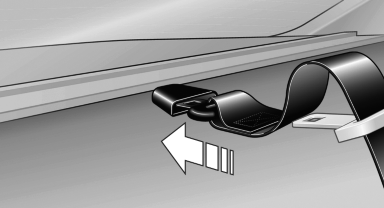
2. Insert the latch plate at the end of the belt
into the specially designated fixture on the
rear window shelf.
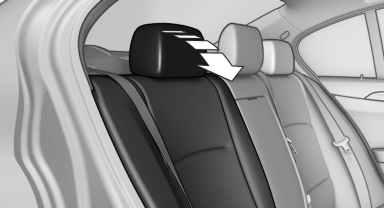
3. Push the corresponding head restraint
down as far as it will go.
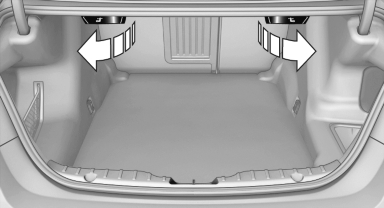
4. Pull the corresponding lever in the cargo
area to release the rear seat backrest.
5. The unlocked rear seat backrest moves forward slightly. Fold the backrest forward by the head restraint.
Closing
1. Return the rear seat backrest to the upright seating position and engage it.
Ensure that the lock is securely engaged
When folding back the backrest, be sure that
it locks in place securely. If it is not properly
engaged, transported cargo could enter the
passenger compartment during braking or
evasive maneuvers and endanger the vehicle
occupants.◀
2. Release the latch plate from the fixture on the rear window shelf and insert it into the belt lock of the center safety belt. Make sure you hear the latch plate engag
To secure cargo, with nets or draw straps, the cargo area is fitted with lashing eyes.
See also:
Switching on automatically
Select transmission position R with the engine
running. ...
Engine and differential
Always obey the official speed limit.
Up to 1,200 miles/2,000 km
Do not exceed the maximum engine and road
speed:
▷ For gasoline engine, 4,500 rpm and
100 mph/160 km/h.
Avoid full-thrott ...
Controls on the interior rearview mirror
Controls on the interior rearview mirror
▷ LED, arrow 1.
▷ Buttons, arrow 2.
▷ The hand-held transmitter, arrow 3, is required
for programming. ...