
Front ventilation
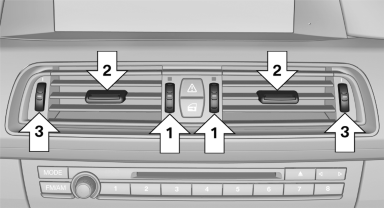
▷ Thumbwheels for adjusting the temperature,
arrows 1.
Toward blue: colder.
Toward red: warmer.
▷ Lever for changing the air flow direction, arrow
2.
▷ Thumbwheels for opening and closing the
vents continuously, arrows 3.
Ventilation levels
▷ Draft-free ventilation:
Thumbwheel, arrow 3, in level  : the
air
current is fanned out.
: the
air
current is fanned out.
▷ Maximum air volume:
Thumbwheel, arrow 3, in level  : the
air is
partially fanned out and partially bundled.
: the
air is
partially fanned out and partially bundled.
This maximizes the air supply.
▷ Direct ventilation:
Thumbwheel, arrow 3, in level  : the
air is
bundled and can be directed to a specific
point.
: the
air is
bundled and can be directed to a specific
point.
Adjusting the ventilation
▷ Ventilation for cooling:
Adjust the vent to direct the air in your direction,
e.g., if the vehicle interior is hot from
the sun.
▷ Draft-free ventilation:
Adjust the vent to let the air flow past you.
See also:
Traffic bulletins on the map
"Traffic conditions/gray map" active:
The Control Display changes to a black and
white display. This enables a better view of the
traffic bulletins. The day/night mode is disregarded
...
Safety switch
The safety switch in the driver's door can be
used to prevent children, for example, from
opening and closing the rear windows using the
switches in the rear.
Switching on and off
Press the butt ...
Deleting the button assignments
1. Press buttons 1 and 8 simultaneously for
approx. five seconds.
2. "OK" ...