
Automatic climate control
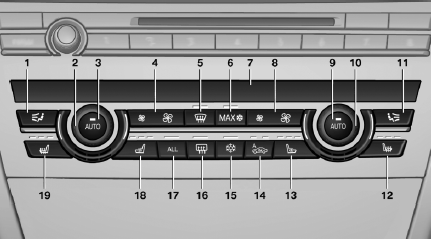
1. Air distribution, left
2. Temperature, left
3. AUTO program, left
4. Air volume, AUTO intensity, residual heat,
left
5. Remove ice and condensation
6. Maximum cooling
7. Display
8. Air volume, AUTO intensity, right
9. AUTO program, right
10. Temperature, right
11. Air distribution, right
12. Seat heating, right
13. Active seat ventilation, right
14. Automatic recirculated-air control/recirculated-
air mode
15. Cooling function
16. Rear window defroster
17. ALL program
18. Active seat ventilation, left
19. Seat heating, left
See also:
Hands-free system
General information
Calls that are being made on the hands-free
system can be continued on the mobile phone
and vice versa.
From the mobile phone to the handsfree
system
Calls that were begun ou ...
EXTERIOR
It's only fitting that a crossover with such performance prowess has such a
chiseled, athletic figure. Despite its considerable size, the X5 looks fit and
trim. Unmistakably a BMW, the X5 has the ...
Towing methods when towing other
vehicles
Tow bar
The tow fittings used should be on the same
side on both vehicles.
Should it prove impossible to avoid mounting
the tow bar at an offset angle, please observe
the following:
▷ C ...